
Get dynamically generated Code::Stats stats on your readmes!
# Features - [Top Languages Card](#top-languages-card) - [Themes](#themes) - [Customization](#customization) - [Deploy Yourself](#deploy-on-your-own-vercel-instance) # GitHub Stats Card Copy paste this into your markdown content, and that's it. Simple! Change the `?username=` value to your GitHub's username. ```md [](https://github.com/Aviortheking/codestats-readme) ``` ### Themes With inbuilt themes you can customize the look of the card without doing any [manual customization](#customization). Use `?theme=THEME_NAME` parameter like so :- ```md  ``` #### All inbuilt themes :- dark, radical, merko, gruvbox, tokyonight, onedark, cobalt, synthwave, highcontrast, dracula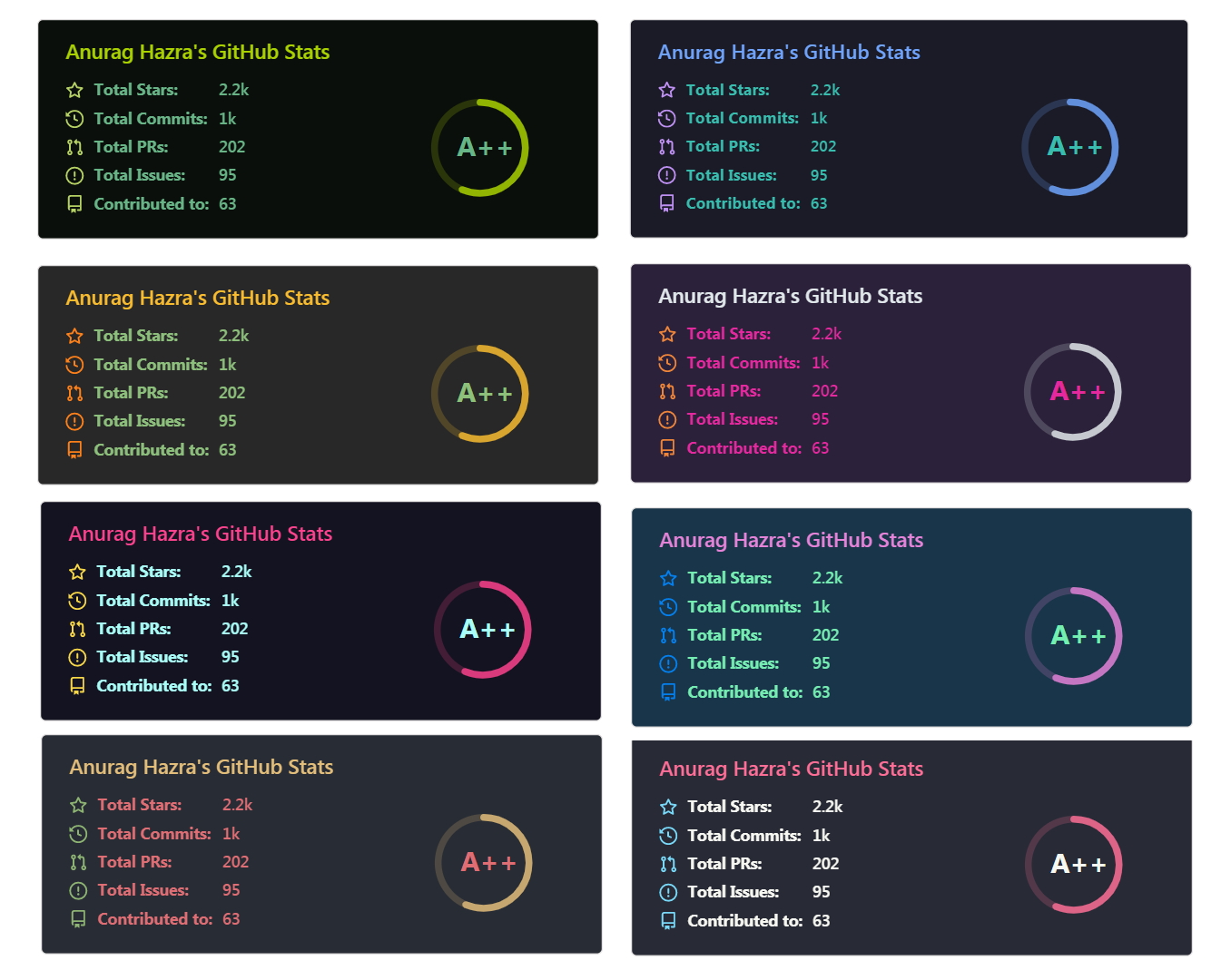 You can look at a preview for [all available themes](./themes/README.md) or checkout the [theme config file](./themes/index.js) & **you can also contribute new themes** if you like :D
### Customization
You can customize the appearance of your `Stats Card` or `Repo Card` however you want with URL params.
#### Common Options:
- `title_color` - Card's title color _(hex color)_
- `text_color` - Body text color _(hex color)_
- `icon_color` - Icons color if available _(hex color)_
- `bg_color` - Card's background color _(hex color)_ **or** a gradient in the form of _angle,start,end_
- `theme` - name of the theme, choose from [all available themes](./themes/README.md)
- `cache_seconds` - set the cache header manually _(min: 1800, max: 86400)_
##### Gradient in bg_color
You can provide multiple comma separated values in bg_color option to render a gradient, the format of the gradient is :-
```
&bg_color=DEG,COLOR1,COLRO2,COLOR3...COLOR10
```
#### Language Card Exclusive Options:
- `hide` - Hide the languages specified from the card _(Comma separated values)_
- `hide_title` - _(boolean)_
- `layout` - Switch between two available layouts `default` & `compact`
- `card_width` - Set the card's width manually _(number)_
> :warning: **Important:**
> Language names should be uri-escaped, as specified in [Percent Encoding](https://en.wikipedia.org/wiki/Percent-encoding)
> (i.e: `c++` should become `c%2B%2B`, `jupyter notebook` should become `jupyter%20notebook`, etc.)
---
# Top Languages Card
Top languages card shows github user's top languages.
_NOTE: Top languages does not indicate your skill level or something like that, it's a metric of which languages you have the coded the most._
### Usage
Copy-paste this code into your readme and change the links.
Endpoint: `api/top-langs?username=anuraghazra`
```md
[](https://github.com/aviortheking/codestats-readme)
```
### Hide individual languages
You can use `?hide=language1,language2` parameter to hide individual languages.
```md
[](https://github.com/aviortheking/codestats-readme)
```
### Compact Language Card Layout
You can use the `&layout=compact` option to change the card design.
```md
[](https://github.com/aviortheking/codestats-readme)
```
### Language Count
You can change the default language count (5) using the `&language_count=10` option.
```md
[](https://github.com/aviortheking/codestats-readme)
```
### Demo
[](https://github.com/aviortheking/codestats-readme)
- Compact layout
[](https://github.com/aviortheking/codestats-readme)
---
### All Demos
- Themes
Choose from any of the [default themes](#themes)

- Gradient

- Customizing stats card

- Top languages
[](https://github.com/aviortheking/codestats-readme)
---
### Quick Tip (Align The Repo Cards)
You usually won't be able to layout the images side by side. To do that you can use this approach:
```md
You can look at a preview for [all available themes](./themes/README.md) or checkout the [theme config file](./themes/index.js) & **you can also contribute new themes** if you like :D
### Customization
You can customize the appearance of your `Stats Card` or `Repo Card` however you want with URL params.
#### Common Options:
- `title_color` - Card's title color _(hex color)_
- `text_color` - Body text color _(hex color)_
- `icon_color` - Icons color if available _(hex color)_
- `bg_color` - Card's background color _(hex color)_ **or** a gradient in the form of _angle,start,end_
- `theme` - name of the theme, choose from [all available themes](./themes/README.md)
- `cache_seconds` - set the cache header manually _(min: 1800, max: 86400)_
##### Gradient in bg_color
You can provide multiple comma separated values in bg_color option to render a gradient, the format of the gradient is :-
```
&bg_color=DEG,COLOR1,COLRO2,COLOR3...COLOR10
```
#### Language Card Exclusive Options:
- `hide` - Hide the languages specified from the card _(Comma separated values)_
- `hide_title` - _(boolean)_
- `layout` - Switch between two available layouts `default` & `compact`
- `card_width` - Set the card's width manually _(number)_
> :warning: **Important:**
> Language names should be uri-escaped, as specified in [Percent Encoding](https://en.wikipedia.org/wiki/Percent-encoding)
> (i.e: `c++` should become `c%2B%2B`, `jupyter notebook` should become `jupyter%20notebook`, etc.)
---
# Top Languages Card
Top languages card shows github user's top languages.
_NOTE: Top languages does not indicate your skill level or something like that, it's a metric of which languages you have the coded the most._
### Usage
Copy-paste this code into your readme and change the links.
Endpoint: `api/top-langs?username=anuraghazra`
```md
[](https://github.com/aviortheking/codestats-readme)
```
### Hide individual languages
You can use `?hide=language1,language2` parameter to hide individual languages.
```md
[](https://github.com/aviortheking/codestats-readme)
```
### Compact Language Card Layout
You can use the `&layout=compact` option to change the card design.
```md
[](https://github.com/aviortheking/codestats-readme)
```
### Language Count
You can change the default language count (5) using the `&language_count=10` option.
```md
[](https://github.com/aviortheking/codestats-readme)
```
### Demo
[](https://github.com/aviortheking/codestats-readme)
- Compact layout
[](https://github.com/aviortheking/codestats-readme)
---
### All Demos
- Themes
Choose from any of the [default themes](#themes)

- Gradient

- Customizing stats card

- Top languages
[](https://github.com/aviortheking/codestats-readme)
---
### Quick Tip (Align The Repo Cards)
You usually won't be able to layout the images side by side. To do that you can use this approach:
```md